

Ad Optimization

Cookie consent banners, while essential for privacy compliance, often hurt Core Web Vitals if not optimized properly.
Although Google has announced it will continue supporting third-party cookies in Chrome, publishers still need to optimize their cookie banners to protect UX, maintain compliance, and maximize revenue.
But, before we dig into the how’s of cookie banner, let’s see how far the cookies have come:

Even in a “post-cookie” era, 78% of digital advertising still depends on cookies, making it essential for publishers to adapt and invest in zero- and first-party data strategies. Strong identity solutions improve user experience, increase control over audience insights, and reduce dependency on third-party data providers, ultimately enabling better segmentation and new revenue opportunities.
When you think of improving your SEO score, the first thing that comes to your mind is the user experience. Without a doubt, user engagement is a clear reflection of your website’s performance. Now, imagine a visitor eager to explore your content, and even before they dive into it, a cookie banner pops up, slowing everything down. Chances are the user abandons your website altogether.
In a world of fast-speed internet and a lack of patience, user expectations are higher than ever, and optimizing cookie banners without compromising the user experience highlights a crucial challenge for publishers like you.
But before we dive deeper into how to optimize cookie banners and the core web vitals, we need to understand what they are, and how they impact each other and the user experience.
If you have ever visited a website and chosen ‘Accept All’ or ‘Reject All’ or ‘Customize Cookie Preference,’ then you have come across what is called a Cookie Banner. It’s a notification that pops up on a screen when a user visits a website seeking and informing about the use of cookies on the website.
A cookie banner typically contains a memo that explains what the message is about, what cookies are, the types of cookies being tracked by the website, why they are used, etc. The cookie banner pops essentially to inform the user about their privacy and provide them control over their data.
So, while cookie banners are essential for informing users about data usage and obtaining their consent, they shouldn't be poorly implemented to drive users away.
Understanding how your website is performing or the quality of experience it delivers shouldn’t be a challenge for a website owner. Hence, Google introduced Web Vitals.
According to Philip Walton, Google, “It is an initiative by Google to provide unified guidance for quality signals that are essential to delivering a great user experience on the web.”
Core Web Vitals are amongst the most important statistics used to analyze and improve website speed and performance. These are a set of three web performance metrics that Google’s search engine uses to measure and make decisions on which web pages to display in search results.
FID is used to calculate the time from the first user interaction with the page (by clicking a link/button, etc.) to the time taken when the browser responds to that interaction.

CLS measures how much the web elements move around the viewport when the page loads
LCP measures the time taken by the largest web element (be it content or an image) to load on the screen.

Cookie banners can directly influence how a website performs across Core Web Vitals. If they load before essential content, contain large visual elements, or trigger layout shifts, they can negatively affect LCP and CLS. Heavy or synchronous scripts can delay browser responses and increase FID. Optimizing when and how cookie banners load is essential for preserving both user experience and SEO performance.
A cookie banner can influence your LCP metric if it contains the largest block of content in the viewport. If Google’s bots consider your banner’s element the largest, your LCP score will depend on how fast your banner loads. However, Google has earlier said that consent pop-ups shouldn’t affect your site’s SEO, but we’ve seen exceptions.
So, your job is to either avoid your banner from containing LCP or make it load so fast that it doesn’t matter if it has the largest element on the screen. We suggest you go with the first option because speeding up the cookie banner would be very tough.
When your banner is already the biggest on the screen, it’s more likely to contain the largest block. Desktop sites may not suffer from this problem because of the available screen real estate, but mobile sites don’t enjoy the same luxury.
The solution is obvious, make the banners as small as possible. Don’t add too much text to it and keep the message as short as possible. Use a ‘Learn more’ link for additional information. Use fonts that don’t take too much space.
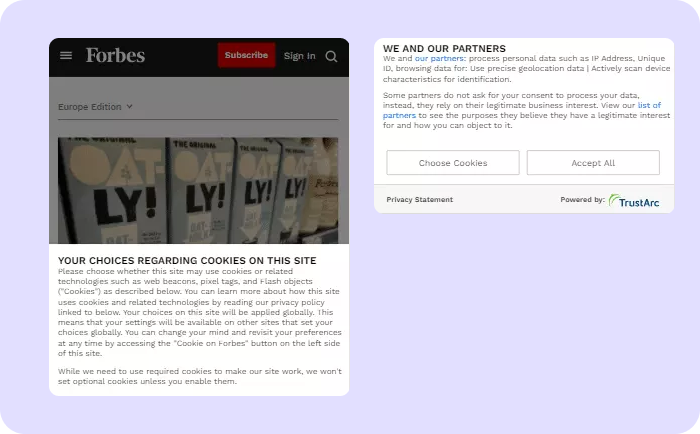
Source: Forbes
If you look at this community thread on Google’s forum, you’ll find that the publisher’s banner is already small, but it contains a scrollable text block. The block is forming the LCP of the page. The probable reason can be that even when the text block is partially visible, its actual size is still the largest on the page. So, the bots are counting it as an LCP element.
As we mentioned earlier that loading the cookie banner faster can be difficult due to its third-party integrations, this situation can lead to a poor LCP score.
To avoid this problem, go with the type of banner we suggested in the previous case. Don’t add scrollable items to your consent banner.

The banner’s loading speed could slow down the load time of other elements. In such a case, the LCP element will be delayed, and the score will be hampered.
The best practice would be to load the banner asynchronously so that the page load is independent of the banner. It’ll have a significant impact on your page load speed. Just ask your developers to implement asynchronous calling to your consent banner/CMP. You can render the banner outside of the viewport and make it slide in as an overlay later.
Another suggestion is to implement pre-fetch or pre-connect so that the browser connects with your banner/CMP in optimum duration. You can refer to this article for help. Preloading your cookie consent script can also be helpful to speed up the process.
Lazy-loading or deferring consent scripts ensures your primary content loads before non-critical scripts. Load cookie banners asynchronously or defer them until after LCP is rendered. This reduces render-blocking, improves page speed, and enhances user experience while still meeting privacy requirements.
Scripts are render-blocking resources. It means if you’re loading them synchronously, your browser can stop rendering page elements while parsing synchronous JavaScript tags. As a result, it can delay the LCP and lead to a poor score.
So, prioritize your page’s native elements if taking users’ consent is not necessary during the initial few seconds of the session. Once LCP is rendered, you can ask for consent with a small banner.
First Input Delay is primarily dependent on the browser’s background processes. If your site makes the browser run too many tasks, it’ll sporadically become unresponsive to user inputs.
Since FID measures the time between the user’s first interaction till the browser’s response, an unresponsive browser will negatively impact your score. Whether you are optimizing for the cookie banner or any other element for FID, the ultimate solution would be to minimize browser processes.
Work with your developers to lower the amount and size of CSS and javascript on your site. Get rid of all unnecessary scripts with no value for the user. Focus on making the page lightweight, compress files, implement Lazy Loading, etc. Doing so will free up your browser from unnecessary network requests and lighter files will allow faster processing.
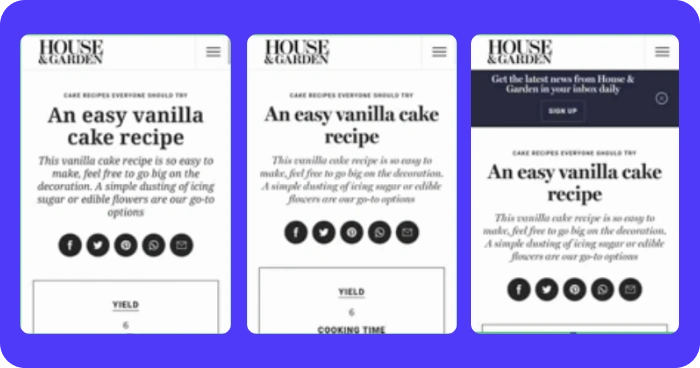
Cookie banners generally appear after some content has already loaded on the page. If your implementation is imperfect, the cookie banner can push the content up or down when it loads on the screen. This movement can appear as a layout shift to Google bots, and your CLS score can suffer. So, you want to make sure that the cookie banner appears without disturbing the content on your page.
Every site renders in a tree structure at the backend. The structure is called Document Object Model, or DOM. The DOM follows a sequence, and if you add your cookie banner to it after it has loaded, the content will shift to make room for the banner.
Ask your developers to reserve space for the banner to avoid shifting. Alternatively, you can create a sticky consent banner or an overlay. You can also set a fixed position for your banner. All these implementations require simple changes in your CSS. You can refer to W3School’s guide on element positioning.
Example:
Complex animations like zoom-out or slide-in can cause layout shifts. It’s advisable to either not use animations at all or try simple ones like fade-in. If you’re an animation fan and can’t let it go, render the cookie banner outside the viewport and make it slide in as an overlay (only after it has loaded completely).
Fonts are styling elements, and they are mostly one of the last to render on third-party cookie banners. When your selected font replaces the unstyled text, the spacing and size can change and cause a layout shift. The same problem can occur if your site doesn’t show any text (invisible text) until the font is loaded.
It’s best to test your fonts before making them live. Use the ones that have no impact on the layout. If changing the font isn’t an option, you can pre-fetch them so they are rendering at the right time. Also, make sure you’re not showing invisible text because it can cause Google’s policy violation.
While optimizing cookie banners improves site speed and user experience, it’s also important to consider how consent collection timing influences your ad-stack performance. If your consent banner delays the firing of ad or analytics scripts, it can postpone ad requests and reduce auction participation, especially in time-sensitive setups like header bidding.
To minimize these effects:
You can’t avoid consent due to the growing number of privacy policies around the world. A cookie banner isn’t necessarily part of your webpage but if you don’t implement it properly, it can have a significant impact on your CWV metrics, and ultimately your search traffic.
It is best to create a universal strategy that applies to all the consent banners on your site (irrespective of privacy law, geography, etc).
Work closely with your CMP to make your banner load faster. Keep testing your banners from time to time to make sure they are working as expected. Prepare a testing checklist to make sure you are inspecting all the scenarios; for example, check for a list of locations, try different devices and models, etc.
You can also use third-party real user monitoring (RUM) tools to keep a tab on how your cookie banner and other page elements are behaving in the real world.

Yes. Cookie banners can impact Core Web Vitals, especially Largest Contentful Paint (LCP) and Cumulative Layout Shift (CLS). If a banner loads too slowly or shifts content, it can lower your CWV score and affect Search engine rankings.
Reserve a fixed layout space in your CSS before the banner loads. Avoid animations that shift content and keep the banner’s position consistent. You can also use overlays or sticky placements to prevent layout movement.
Yes. GDPR and CCPA require websites to inform users about cookie usage and allow them to give or reject consent. A properly optimized banner ensures compliance without sacrificing site speed.
Yes — server-side banner rendering typically reduces render-blocking scripts, improving page responsiveness. However, client-side CMPs (Consent Management Platforms) may offer easier customization. The best choice depends on your setup.

.webp)


.avif)
.avif)


